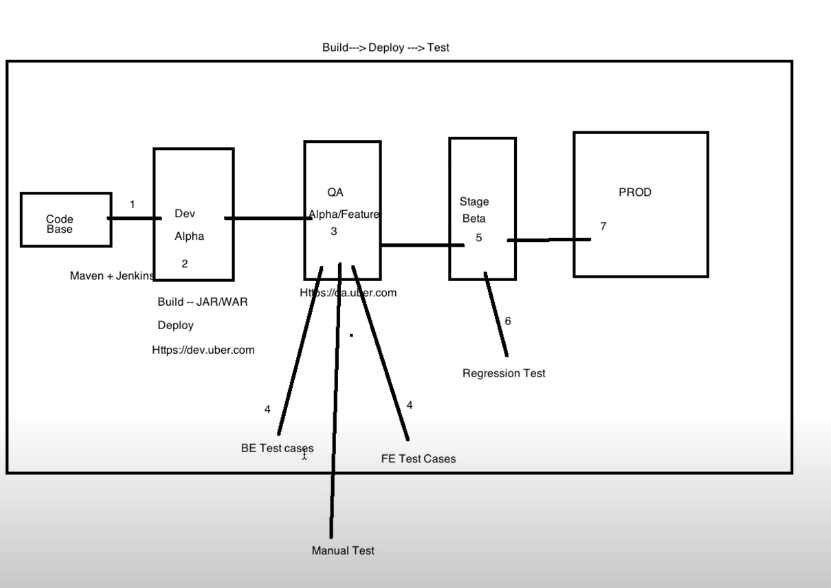
cicd process

https://www.youtube.com/watch?v=9jRu-sFC8Xw 


Comments

Popular posts from this blog

Reducing Manual Tasks in Salesforce DevOps

  🚩Focus: Automating the Deletion of Old Flow Versions ❓One of the most frequently asked questions I get as a DevOps Consultant is: “How can we reduce manual tasks during deployments?” A common manual task is deleting outdated Flow versions in Salesforce. Here’s why automating this step is valuable: 🚨 Why Automate This? Deleting old Flow versions is a best practice that helps in several ways: Improves overall performance Reduces clutter in the environment Makes the system easier to manage, especially during continuous development and iteration How to Automate Flow Deletion Deleting old Flow versions is fairly simple in itself, but doing it manually across multiple orgs during forward or backward promotions can become a tedious and error-prone process. 🚩Here are a few ways to automate it: 1. Using Salesforce Inspector Reloaded or Other Tools Supporting Tooling API You can run a query to fetch obsolete Flow versions and delete them using tools that support the Tooling API. 2. Usin...

Sending mail using powerscript

$EmailFrom = "XXXXXX@gmail.com" $EmailTo = "XXXXX@outlook.com" $Subject = "Subject" $Body = "Body" $SMTPServer = "smtp.gmail.com" $SMTPClient = New-Object Net.Mail.SmtpClient($SmtpServer, 587) $SMTPClient.EnableSsl = $true $SMTPClient.Credentials = New-Object System.Net.NetworkCredential("XXXXX@gmail.com", "XXXXXXX"); $SMTPClient.Send($EmailFrom, $EmailTo, $Subject, $Body)

Salesforce Deployment Software installation

sudo su - yum install git  you can skip the below because node is installed in sfdx package curl -o- https://raw.githubusercontent.com/nvm-sh/nvm/v0.34.0/install.sh | bash . ~/.nvm/nvm.sh nvm install node node -e "console.log('Running Node.js ' + process.version)" Please don't run npm install --global sfdx-cli in AWS Ec2 machine, when you run this command, the ec2-machines hangs and won't respond. reboot the ec2 instance and run the below commands to install sfdx manually. wget https://developer.salesforce.com/media/salesforce-cli/sfdx/channels/stable/sfdx-linux-x64.tar.xz mkdir /opt/sfdx tar xJf sfdx-linux-x64.tar.xz -C /opt/sfdx --strip-components 1 export PATH=/opt/sfdx/bin:$PATH if you have to edit the PATH, then use set PATH="path" Go jenkins plugins and install custom tool plugin Go to global tool configuration  Under Custom tool Name: toolbelt exported path: /usr/bin/sfdx/bin Installation directory /usr/bin/sfdx/bin/sfdx The right way of insta...